RedactionResearchGitHub

Open-source PDF forensic tool

PDF Redaction Checker for Hidden Text and Data Leaks

A PDF can look redacted while the original text is still stored inside the document. RedactionResearch checks whether supposedly hidden information remains technically present, then gives you a local interface for reviewing the evidence.

  • Local processing
  • Human-reviewed findings
  • Open source
  • ISC license

The problem

A black box is not always a redaction

PDFs are collections of text, images, annotations, forms and document metadata. Drawing a dark rectangle above a name can make the page look safe while leaving the name selectable, searchable or extractable. The text may sit beneath another page object, inside a form field, or elsewhere in the PDF structure.

Secure redaction removes sensitive information from the document. Simply covering it visually may leave the original data intact. That does not mean every black rectangle is insecure; it means appearance alone cannot confirm that a PDF was properly redacted.

RedactionResearch checks the PDF itself for technical indicators of an incomplete or failed PDF redaction. Each indicator still requires human verification before it should be treated as an actual disclosure problem.

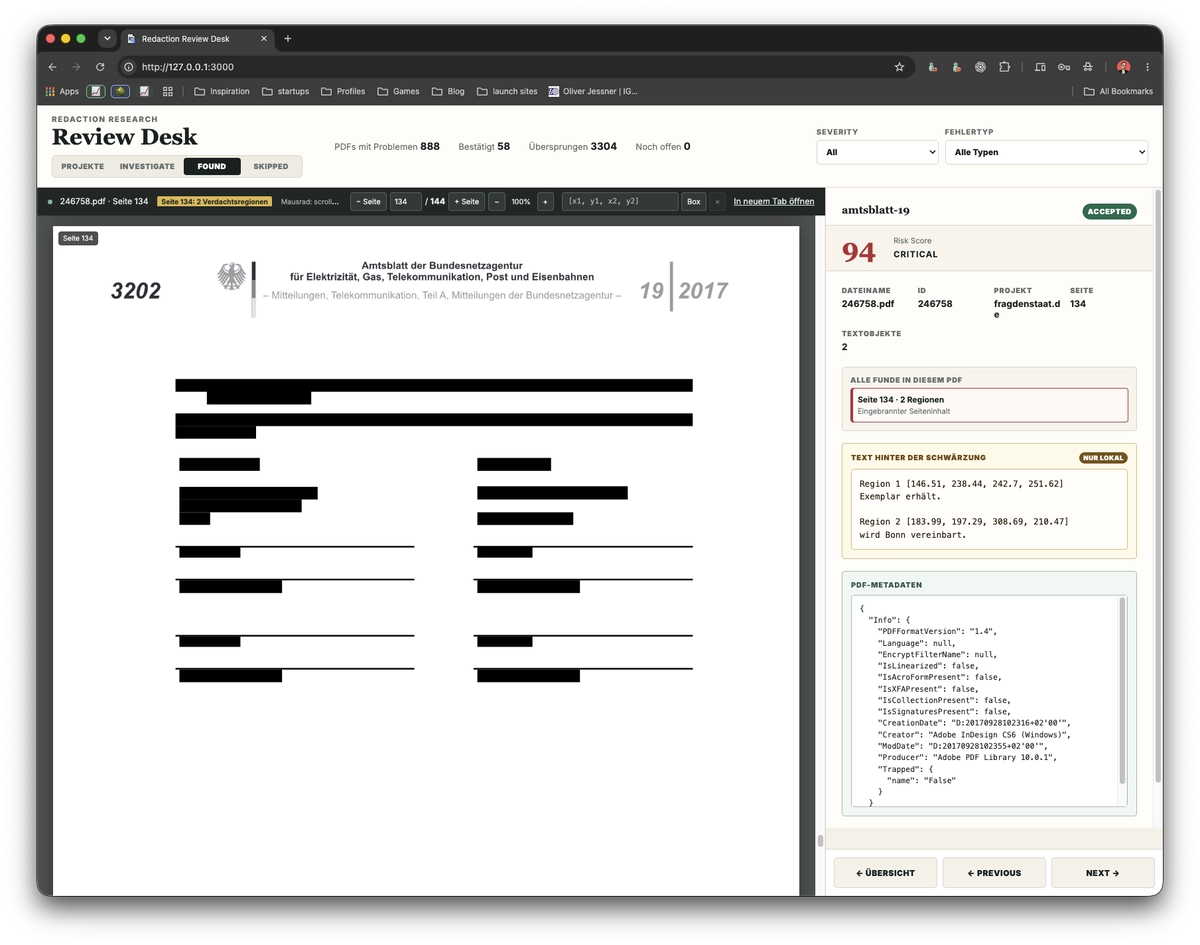
RedactionResearch reviewing a PDF where black redaction boxes still contain machine-readable text
The review interface combines the affected PDF page, suspicious regions, reconstructed text, document metadata and a risk score so the finding can be assessed in context.

Local review workflow

How RedactionResearch checks a PDF

Import locally, scan the document structure, and decide what the evidence actually means.

  1. Import PDFs

    Create a project and choose a local folder. RedactionResearch imports the PDF files into the project workspace and keeps the collection organized for repeat scans and review.

  2. Run the forensic scan

    The scanner examines document objects and contextual signals for possible redaction failures, hidden machine-readable text and sensitive information outside the visible page.

  3. Review every finding

    Open the actual PDF, jump to affected pages, inspect coordinates and reconstructed text, review metadata, evidence and risk score, then choose Accept or Skip.

The scanner does not automatically declare every technical signal to be a data leak. Human review is a deliberate part of the workflow.

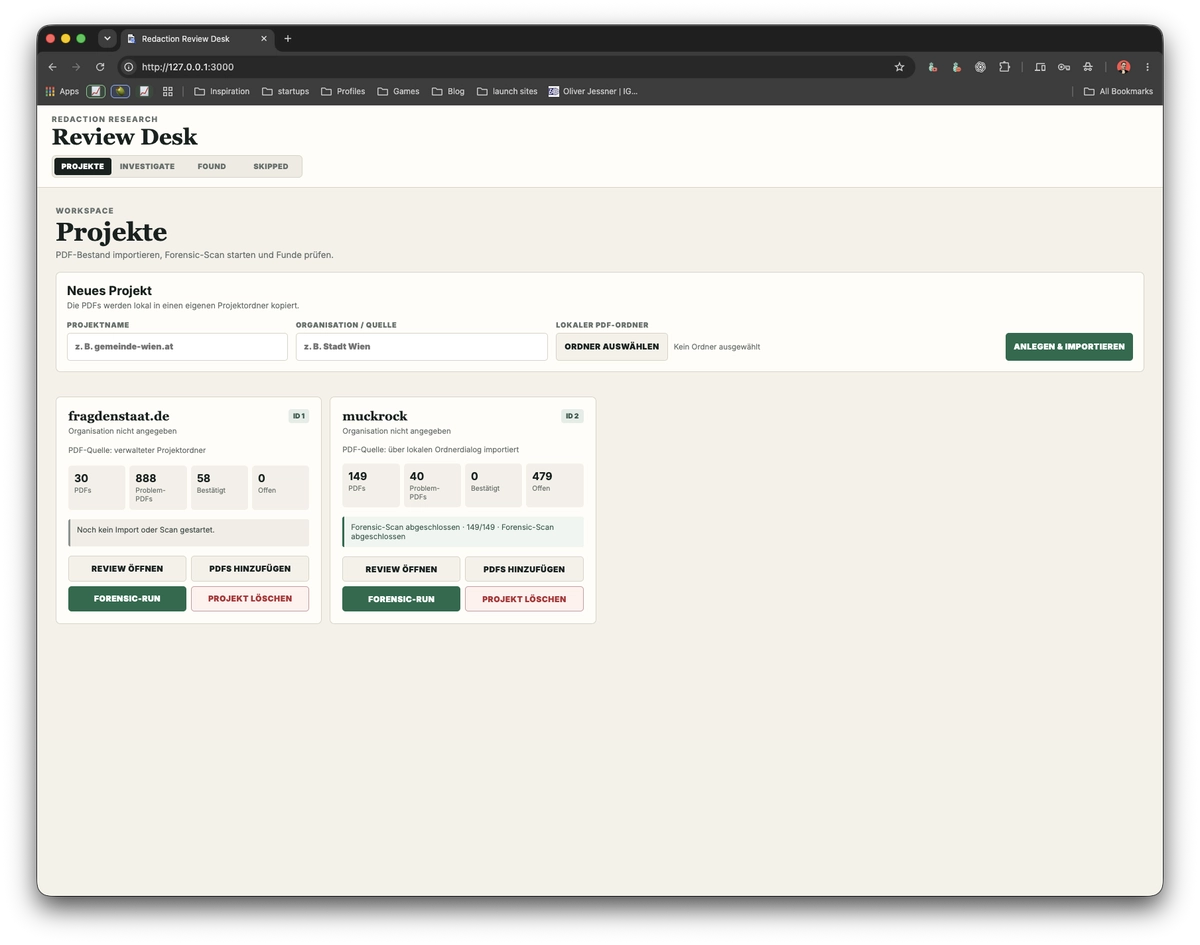
RedactionResearch project dashboard showing imported PDF projects and forensic scan progress
Projects keep imported PDFs, forensic-run progress and review status together.

Project overview

Audit a collection, not just one page

The project workflow is designed for reviewing more than a single suspicious file. Add PDFs, run the scanner across documents that have not already completed successfully, and track open findings from one local dashboard.

Accepted findings are collected separately. Skipped findings remain available, so a decision can be inspected again when context changes or a second reviewer takes over.

Detection coverage

More than a black-box redaction checker

The scanner combines direct evidence with contextual signals. The human-readable issue comes first; detector identifiers are included for technical traceability.

Hidden or covered text

Flags genuine redaction annotations over live text, dark annotations, overlay objects, dark page content and machine-readable text that is visually hidden.

  • REDACTION_ANNOTATION_WITH_LIVE_TEXT
  • DARK_ANNOTATION_OVER_LIVE_TEXT
  • ANNOTATION_OVERLAY_HIDES_LIVE_TEXT
  • DARK_PAGE_CONTENT_HIDES_LIVE_TEXT
  • LIVE_TEXT_NOT_VISIBLE_ON_WHITE_REGION

Other sensitive PDF data

Checks PDF/XMP metadata, populated form fields, bookmark outlines, suspicious embedded attachments and incremental revisions. These channels can matter even when the visible page was correctly sanitized.

For detected email, IBAN and phone patterns, the scanner stores the category rather than persisting the matched value as review text.

Supporting forensic signals

Records optional content layers, embedded files, populated form fields and revision history as context. These signals can guide an investigation but are not necessarily evidence of a leak by themselves.

Risk score and severity help prioritize review; they do not replace examination of the document and its purpose.

Local-first by design

Your PDFs stay on your machine

RedactionResearch runs as a local web application. PDFs are not uploaded to a hosted RedactionResearch service, and analysis results and review decisions remain on the computer where the application is running.

SQLite stores projects, findings, scan state and Accept or Skip decisions locally. Extracted PDF content and reconstructed text are displayed in the local interface. This makes the local PDF redaction checker useful when documents should not be sent to an external scanning service.

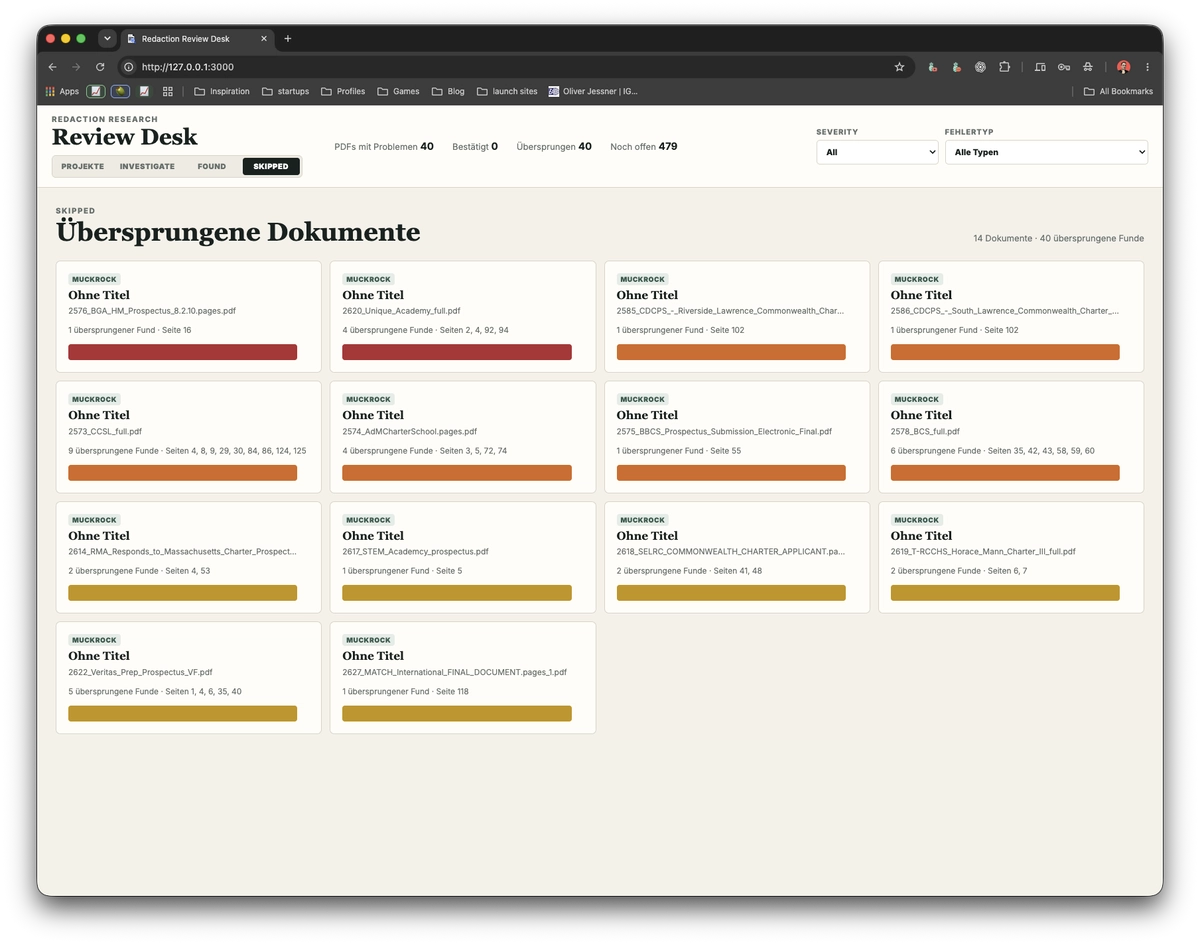
RedactionResearch overview of skipped PDF findings after manual review
Skipped findings remain available for inspection and can be revisited later.

Human verification

Forensic signals still need human review

PDF internals are messy. Legitimate annotations, form data or revision history can look suspicious without exposing sensitive information. RedactionResearch intentionally keeps technical detection separate from confirmation.

Choose Accept for a confirmed problem or Skip for a benign structure or false positive. Confirmed items appear under Found; skipped items stay under Skipped rather than disappearing from the audit trail.

Potential use cases

Who is RedactionResearch for?

RedactionResearch can be useful for people who publish, receive or audit redacted documents.

  • Investigative journalists
  • Public-records and freedom-of-information researchers
  • Security researchers
  • Privacy teams
  • Organizations publishing redacted documents
  • Developers working with PDF processing
  • Researchers auditing large PDF collections

A necessary limit

Can it recover properly redacted text?

No.

If sensitive content was properly removed from the PDF, RedactionResearch cannot recover it. The tool finds cases where information is still technically present in the file.

It is not a magical utility for reading text behind every PDF redaction. It is a forensic check for information that a broken redaction, metadata field or other document structure failed to remove.

Installation

Run RedactionResearch locally

Install RedactionResearch globally with npm or Homebrew, then launch the local review interface from your terminal.

npm

Preferred

Install RedactionResearch globally from the npm registry:

npm install --global redaction-research

Then start the application:

RedactionResearch

Requires Node.js 22.5 or newer.

Homebrew

Preferred

For macOS and other Homebrew environments:

brew install oliverjessner/tap/redaction-research

Then start the application:

RedactionResearch

Homebrew resolves the formula dependencies automatically.

Local interfacehttp://127.0.0.1:3000/

Homebrew offers a one-command setup for this PDF redaction checker for macOS and other Homebrew environments; npm is the direct package-registry option for supported Node.js environments.

FAQ

PDF redaction checker questions

Practical answers about hidden text, local processing and what a forensic result means.

How do I check if a PDF is properly redacted?

Do not rely on visual inspection alone. Check the file for remaining live text, annotation overlays, metadata, form values, attachments, bookmarks and revision history, then review every technical finding in context.

Can text remain underneath a black box in a PDF?

Yes. A rectangle or annotation can visually cover text while leaving the original text object selectable, searchable or extractable inside the PDF.

Can RedactionResearch recover properly deleted text?

No. If the original information was genuinely removed from the PDF, there is nothing to recover. RedactionResearch only exposes or flags information that remains technically present in the file.

Does RedactionResearch upload my PDFs?

No hosted upload is part of the application. PDFs, analysis data and review decisions stay on the machine where RedactionResearch is running.

Does it only detect black rectangles?

No. It also examines redaction and overlay annotations, visually hidden text, metadata, form fields, bookmark outlines, embedded attachments and incremental PDF revisions.

Does every finding mean sensitive information was leaked?

No. Findings are forensic indicators, not automatic breach declarations. A human should inspect the PDF, the affected region and the supporting evidence before accepting or skipping a finding.

Can it scan multiple PDFs?

Yes. Create a project, import a local folder of PDFs and run the forensic scan across documents that have not already been scanned successfully.

Is RedactionResearch a PDF redaction editor?

No. It is an open-source PDF redaction tool for detecting and reviewing potentially incomplete redactions, not for authoring or sanitizing redactions.

Open source · local review

Audit your PDFs before a bad redaction becomes a data leak

Use an open-source PDF redaction tool to inspect the file, review the evidence and make an informed decision before publication.