
 PineFetch
Your local video download queue for Mac.
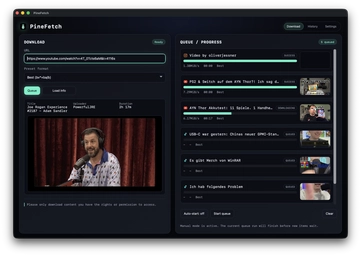
Paste permitted links, import TXT files, extract audio, and keep your workflow local with a clean yt-dlp-powered macOS app. PineFetch queues downloads without cloud uploads.
For your own content, Creative Commons/Public Domain material, or content you have permission to download.
Apple Silicon build. Intel Mac support coming later. View latest release.
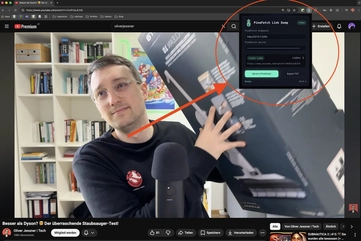
Send links from Chrome straight into PineFetch.
PineFetch is growing into a small workflow ecosystem. With PineFetch Link Dump, the companion Chrome extension, you can send individual video links or bulk link collections directly to PineFetch and keep the desktop queue moving without manual copy-paste.
Built for yt-dlp-supported platforms.
PineFetch can queue permitted links from YouTube, TikTok, Instagram, Facebook, Twitch, X (Twitter) and other yt-dlp-supported sites, while the workflow stays on your Mac.
From short clips to long-form videos: paste permitted links from different sources and manage them in one app.
Setup in 60 seconds
PineFetch uses yt-dlp locally. Install the command-line dependencies once, download the app, then choose where your files should land.
Install checklist
-
Install Homebrew if it is not already on your Mac.
/bin/bash -c "$(curl -fsSL https://raw.githubusercontent.com/Homebrew/install/HEAD/install.sh)" -
Install dependencies:
brew install yt-dlp ffmpegyt-dlpis required.ffmpegandffprobeare recommended for audio and video processing. -
Install PineFetch:
brew install --cask oliverjessner/tap/pinefetch--casktells Homebrew that PineFetch is a macOS desktop app rather than a command-line package. Homebrew downloads the app and placesPineFetch.appin your Applications folder. Prefer a manual install? Use the download button above instead. - Choose your download folder and start queueing links.
PineFetch finds yt-dlp automatically when it is in your PATH. Otherwise, set the full path
in Settings.
Prefer watching the setup?
Open the short walkthrough on TikTok. The embed script is not loaded on this page.
Open setup videoHow it works
Three steps. Zero fuss.
Paste or import links
Insert a URL manually, use Magic Import, or import a .txt file with
YouTube links.
Pick a preset
Best quality, audio-only, or text mode — always for your own content.
Start download
It lands in the queue, shows live progress, and remains available in History after completion.
UI details you actually notice.
Subtle glass panels, clear status, and a queue-plus-history flow that keeps context intact.
Queue / Progress
Always know what’s done, downloading, and next.
Terminal Log
Flip it on when you need transparency, keep it hidden when you don’t.
Presets
Fast decisions with clear modes you can trust.
Magic Import
Small control, less friction: pull supported links into PineFetch without breaking your flow.

TXT Import
Load a text file, detect YouTube & TikTok links, and fill the queue without copy-pasting each URL.
History
Look back at completed downloads without reconstructing yesterday's workflow from scratch.
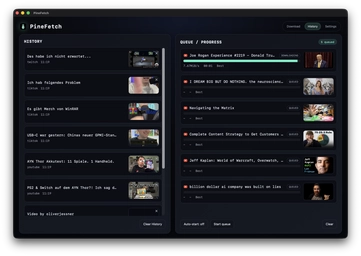
See how PineFetch looks in real use.
Actual app screens from version 1.9.0: settings, download flow, history, and local link routing.
Built for power users & creators.
Lightweight, focused, and respectful of your rights.
FAQ
Clear answers, no shortcuts.
Is it legal?
PineFetch is for content you own or have explicit permission to download. Always follow platform terms and local laws.
What is yt-dlp?
yt-dlp is a trusted open-source CLI tool. PineFetch uses it as the download engine.
Do I need ffmpeg?
Install yt-dlp and ffmpeg with Homebrew. yt-dlp is the required download engine; ffmpeg and ffprobe are recommended for audio and video processing.
Does PineFetch support Intel Macs?
The current downloadable DMG is an Apple Silicon build. Intel Mac support is not available in the current release.
What does Magic Import do?
Magic Import helps you pull a supported link into PineFetch faster, so queueing starts with less copy-paste overhead.
Can I import a TXT file of YouTube links?
Yes. PineFetch can read a plain text file with YouTube links and add the valid URLs to the queue.
Can I send links from Chrome?
Yes. PineFetch Link Dump is a companion Chrome extension for sending individual links or bulk link collections directly to PineFetch.
Where are files saved?
Downloads go to a local folder you choose. No cloud uploads.
Ready to queue downloads locally?
Download PineFetch for macOS and keep permitted downloads faster to start, easier to revisit, and local to your Mac.
Apple Silicon build. Intel Mac support coming later. View latest release.
PineFetch